Checkout by Polar·Immediate access after checkout·Free things stay free
Collection 02 · Transparent PNGs
AfterHours
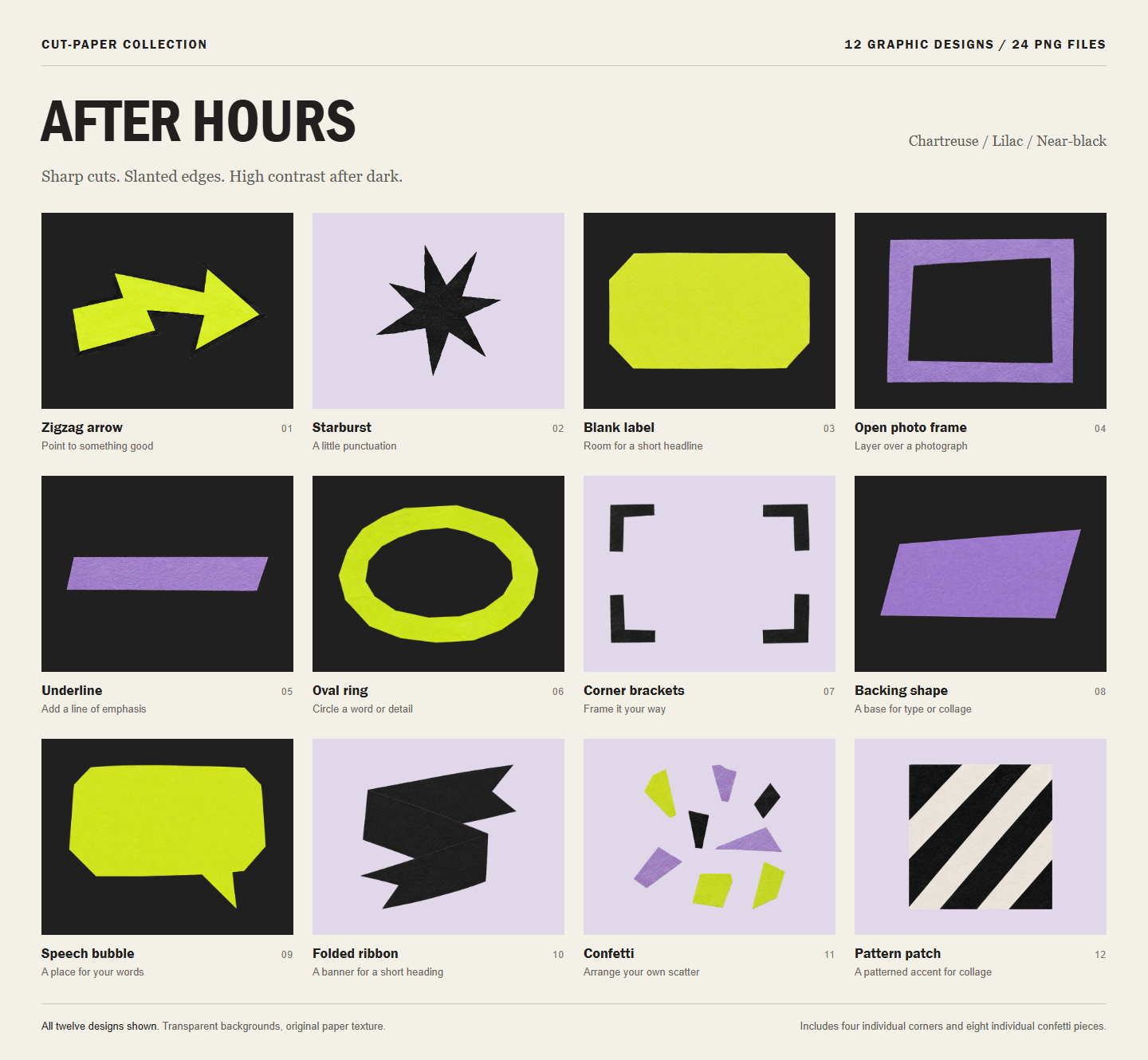
A collection of cut-paper-style accents in chartreuse, lilac and near-black. Angular cuts, slanted shapes and visible paper texture add contrast to posts, presentations and other layouts.
- Chartreuse
- Lilac
- Near-black
$5USD · one-time
12 designs
24 transparent PNGs
Creative direction and curation by Tide. Artwork generated with AI and prepared as ready-to-use transparent PNGs.
Review the graphics license v1.0. You will confirm agreement at checkout.
Buy for US$5One-time purchase. Secure checkout and file delivery through Polar. Applicable tax is shown at checkout.
Inside the ZIP
Twelve designs.
More ways to arrange them.
Use a complete design as it comes, or place each corner and confetti piece separately. All the graphics shown in the preview are included.
Zigzag arrow
Point to something worth seeing.
Starburst
Add a little punctuation.
Blank label
Make room for a short headline.
Open photo frame
Layer over a cropped photograph.
Underline
Give a word some emphasis.
Oval ring
Circle a word or detail.
Corner brackets
Frame the edges your way.
Backing shape
Build a base for type or collage.
Speech bubble
Add your own message.
Folded ribbon
Set a short heading on the front panel.
Confetti
Arrange your own scatter.
Pattern patch
Layer in a patterned paper accent.
Already tried the sampler? This collection includes those same three graphics, plus nine other designs and the separate corner and confetti pieces.
Into your own layout
Unzip.
Upload.
Make it yours.
Open the files.
Unzip the download to find the complete designs and the separate corner and confetti pieces.
Bring them into your editor.
Upload a PNG to Canva or another application that supports transparency. The background stays clear around the paper.
Add your content.
Layer in your text or photograph, keep the graphics in proportion, and leave comfortable space inside labels and speech bubbles.
A few useful details
Before you
put them to work.
What size are the PNG files?
These are the native pixel dimensions, including transparent padding. The separate corners and confetti pieces are smaller accents. Check your intended output size before enlarging them.
| Graphic | Width × height (px) |
|---|---|
| Arrow | 1643 × 838 |
| Starburst | 1150 × 1198 |
| Label | 1608 × 955 |
| Photo frame | 1320 × 1030 |
| Underline | 1754 × 336 |
| Oval ring | 1352 × 948 |
| Corner brackets | 1354 × 963 |
| Backing shape | 1527 × 703 |
| Speech bubble | 1303 × 966 |
| Ribbon | 1083 × 1004 |
| Confetti | 1099 × 1057 |
| Pattern patch | 1155 × 1172 |
| Graphic | Width × height (px) |
|---|---|
| Corner top left | 342 × 362 |
| Corner top right | 352 × 356 |
| Corner bottom left | 344 × 364 |
| Corner bottom right | 353 × 375 |
| Confetti 01 | 220 × 307 |
| Confetti 02 | 270 × 390 |
| Confetti 03 | 232 × 296 |
| Confetti 04 | 192 × 313 |
| Confetti 05 | 513 × 221 |
| Confetti 06 | 383 × 336 |
| Confetti 07 | 278 × 380 |
| Confetti 08 | 329 × 287 |
How were the graphics made?
Tide chose the palette, cut-paper style and mix of graphics for each collection. AI generated the artwork from detailed design instructions. Tide reviewed the collections as they developed and selected the final sets. The files were then prepared as transparent PNGs and checked in example layouts. The cut-paper texture is digitally generated.
What do I receive?
A ZIP containing 24 transparent PNG files: twelve complete designs, four separate corners and eight separate confetti pieces. Preview sheets, instructions and a file inventory are also included. The extra pieces are movable components of the designs, not additional designs.
Do I need Canva?
Use any design application that supports PNG transparency. You can upload the files to Canva, but no editable Canva template or template link is required. Add your own text and images in your chosen editor.
How is this different from the free sampler?
The free sampler includes an arrow, starburst and speech bubble from each collection. This complete collection includes its three sampler designs plus nine other designs, along with the individual corner and confetti files. The sampler graphics are the same files at the same resolution as their paid counterparts.
Can I change the colors or edit the shapes?
These are raster PNGs with the colors and paper texture baked into the pixels. You can resize, rotate and arrange them in your editor. Recoloring depends on your editing tool; the files do not have editable vector layers. No font software is included.
How do the frames and pattern patches work?
A photo frame is a PNG overlay: place a photograph behind it and crop the photo to fit beneath the paper. Pattern patches are single paper accents with opaque light areas, not seamless repeating tiles. Keep the aspect ratio locked when resizing and check sharpness at your final size. Native pixel dimensions are listed in the included inventory.
Where can I read the usage terms?
The same graphics license applies to the free sampler and the complete collections. Read the full Cut-Paper Graphics License for creator seats, client work and restrictions on sharing the reusable files. Review it before purchase.
Two palettes to work with
Meet Color Club.
Rounded cuts. Bright paper. Your layout.